


For Australian and New Zealand wineries

Winery software, from vineyard to customer.

Made by a winemaker. For winemakers.

For wineries crushing about 50 to 5,000 tonnes: your vineyard, cellar, stock and sales in one place, with the cost of every wine.

Try the free demoSee pricing

No credit card. 24 hours in a working winery.

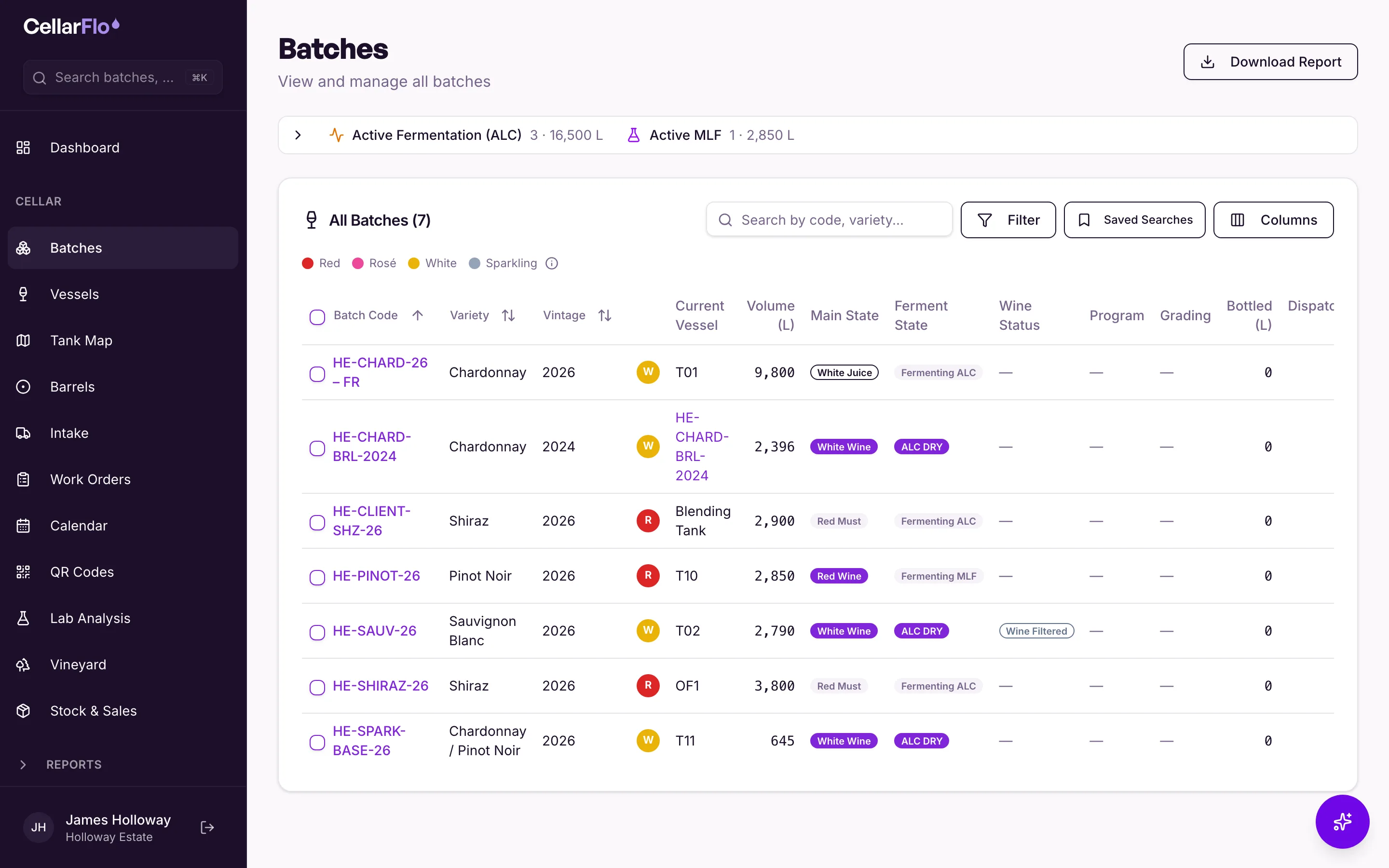
The Batches list with its Filter and Columns buttons: every batch with its variety, vintage, vessel, litres and product state, in the CellarFlo demo winery.
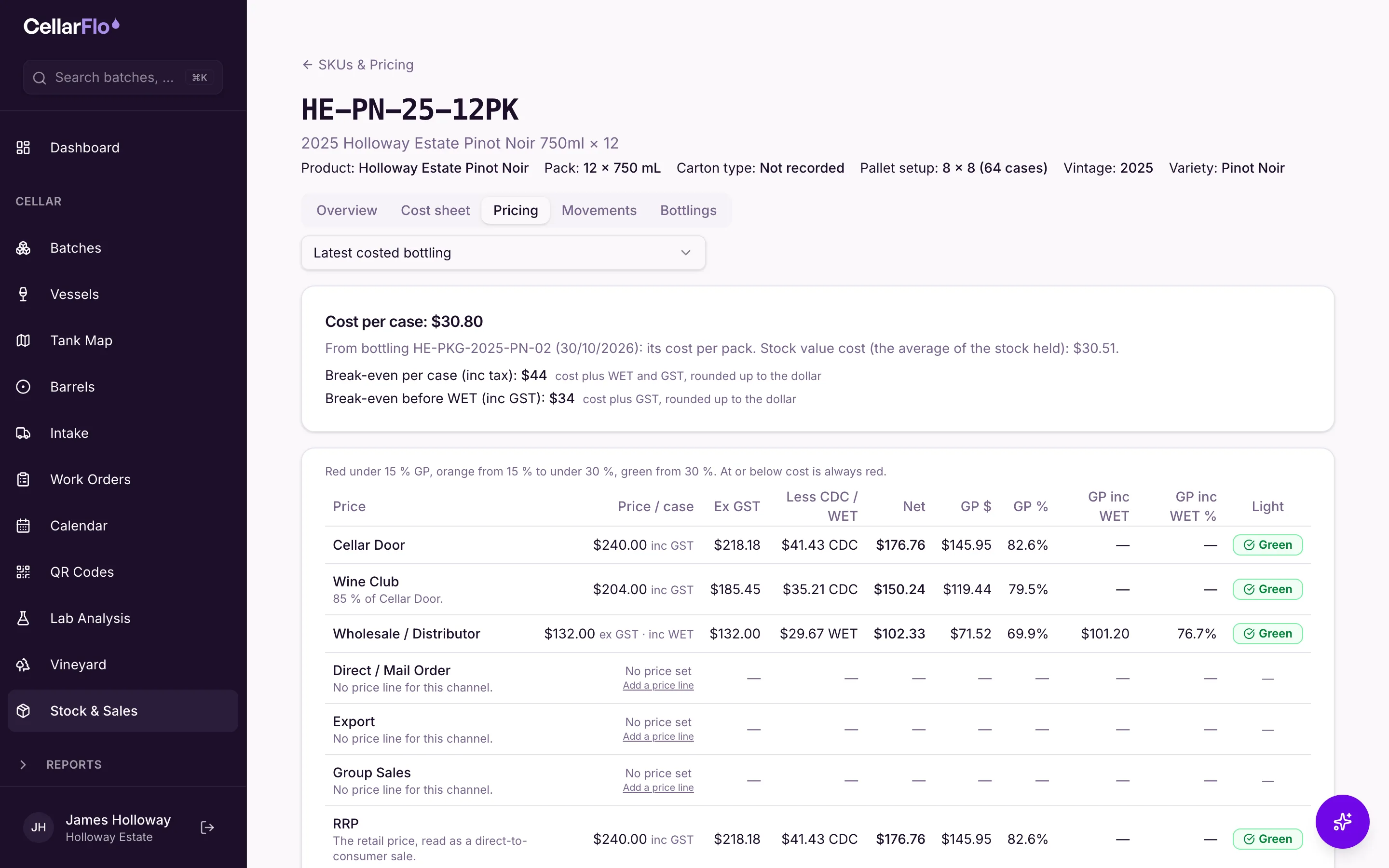
Close-up of a SKU in Stock & Sales: a dozen of 2025 Pinot Noir with its cost per case of $30.80 from its bottling and its break-even prices, in the CellarFlo demo winery.
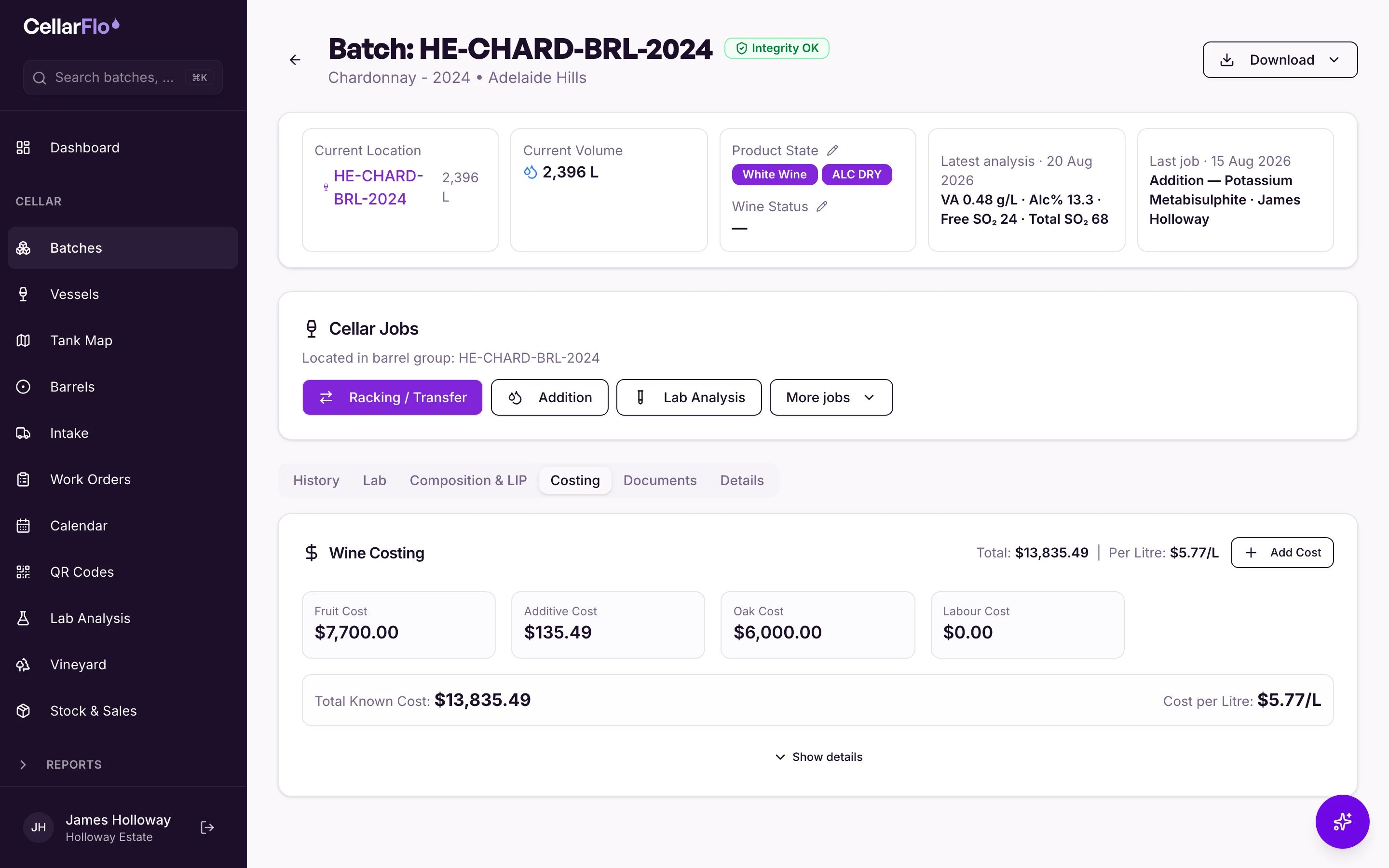
Close-up of a batch’s Wine Costing card: fruit cost $7,700.00, additive cost $135.49, oak cost $6,000.00 and a total known cost of $13,835.49, in the CellarFlo demo winery.
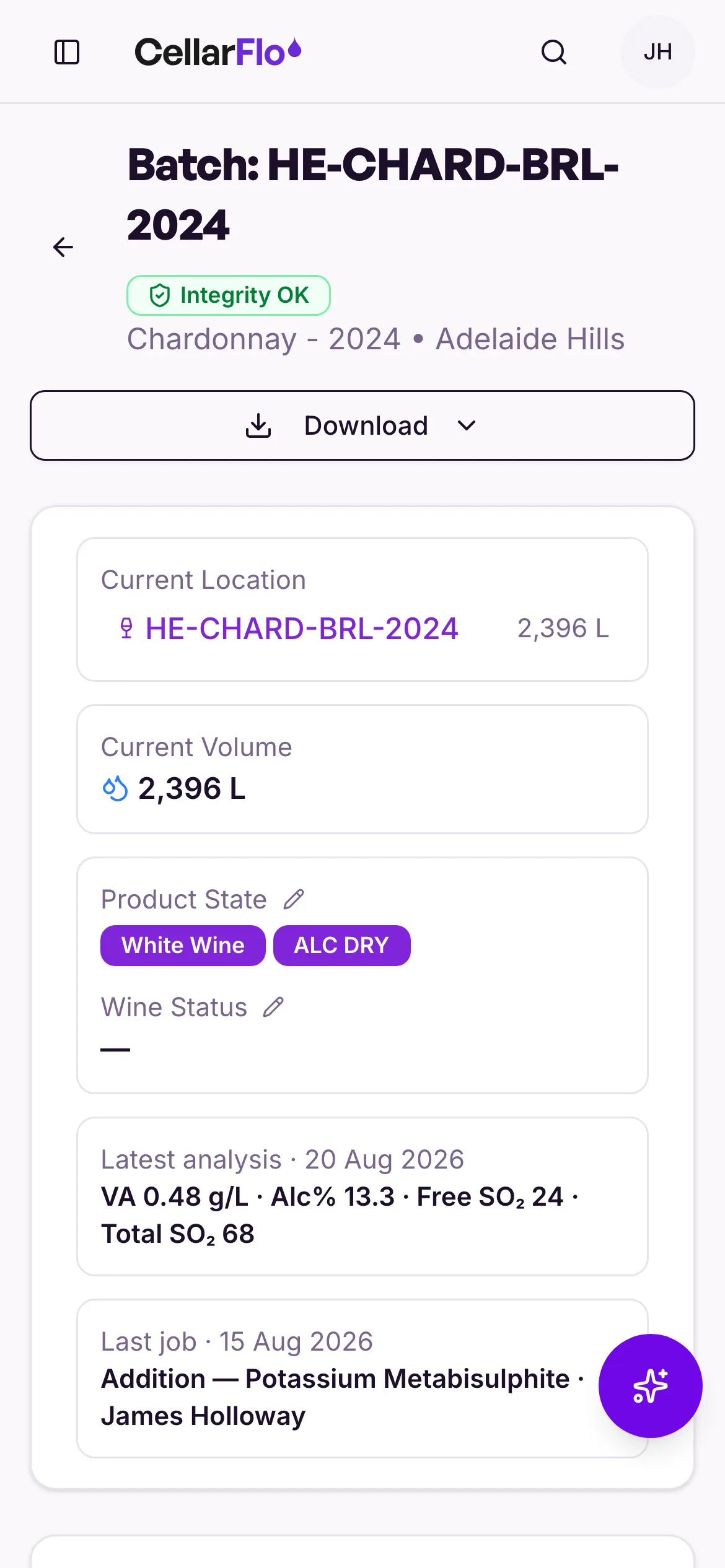
A batch page on a phone: a 2024 Adelaide Hills Chardonnay with its location, volume, product state and latest analysis, in the CellarFlo demo winery.

Works with

  • Xero
  • MYOB
  • QuickBooks
  • Commerce7
  • TankNet
  • VinWizard
  • FOSS

Accounting and Commerce7 connections are on Estate and above. Xero, MYOB, QuickBooks, Commerce7, TankNet, VinWizard and FOSS are trademarks of their owners.

Why CellarFlo

Less admin. Records kept. Numbers you can see.

  • Less admin.

    Jobs, Work Orders and lab results are entered once, as the work is done, and each one goes straight onto the wine’s record. No copying the cellar book into a spreadsheet at the end of the week.

  • Records kept as you work.

    Every job is a dated entry with the name of the person who entered it, for your Label Integrity Program records. Recall a finished wine back to its vineyard, and prepare WET and levy reports from the same records.

  • Know your numbers.

    See the cost per litre of every wine as it stands today, from fruit to bottle. With Stock & Sales, see your stock on hand and the margin on every SKU and channel.

What it does

From the vineyard to the customer, in one place.

Vineyard

Bring fruit decisions into the same view as your winery.

Record maturity samples, plan your picks, and connect each pick to the fruit that arrives at the winery.

  • Maturity samples with Baumé or Brix, pH and TA, charted with an estimate of when fruit reaches your target
  • A Harvest Planner to schedule picks, move dates and track planned and actual tonnes
  • Every fruit docket names its grower, vineyard and region, and stays linked to the wine it became
Close-up of Product Recall for a 2025 Pinot Noir: its fruit docket with the grower, the vineyard and its address, the GI, 2,600 kg of fruit and the 1,900 litres of it in this wine, in the CellarFlo demo winery.

Cellar

Know your cellar at a glance.

From fruit intake to bottling, every job is recorded on the wine it touches, and your team works from the same plan.

  • A Tank Map showing what is in every tank and barrel, and how full it is
  • Work Orders your cellar team can print and work from, listing every vessel and barrel
  • Lab results, ferment progress and trend charts beside the wine
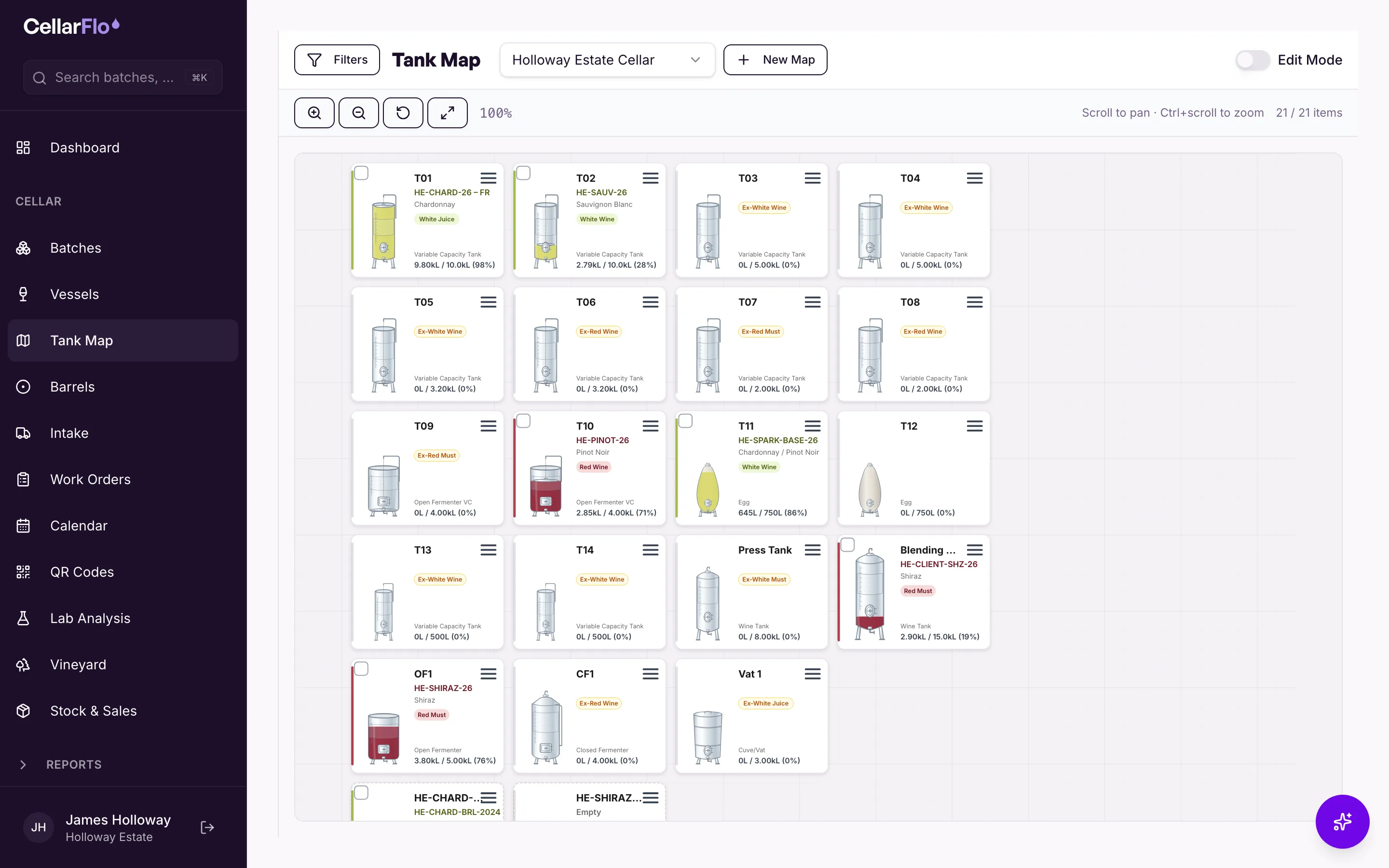
The Tank Map: every tank, egg and fermenter drawn with its fill level, batch, variety and litres, and the barrel groups below, in the CellarFlo demo winery.

Stock & Sales

Every bottle, from the tank to the customer.

Plan bottlings, hold stock by warehouse and sell it, with every bottle still connected to the wine it was filled from.

  • A Bottling Schedule that warns when a planned bottling will run short of dry goods
  • Stock on hand by warehouse, in cases, bottles, pallets and dozen equivalents
  • Sale Orders from picking to dispatch, with gross profit by channel, customer and SKU

Stock & Sales is on Estate and above.

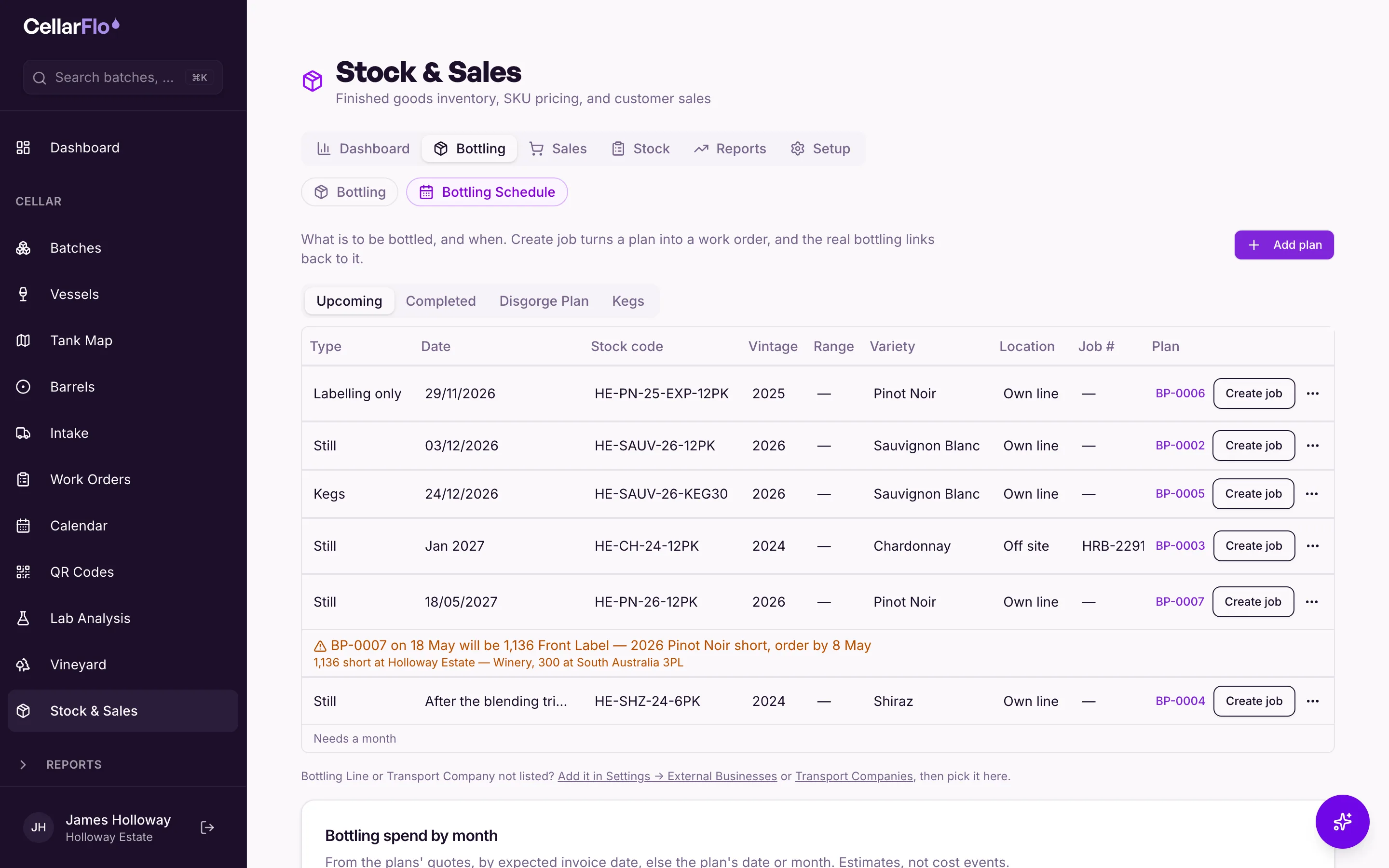
The Bottling Schedule in Stock & Sales: upcoming still, keg and labelling-only bottlings by date and SKU, with a warning that a planned run will be short of front labels and when to order them, and the bottling spend by month, in the CellarFlo demo winery.

Wine costing

See what goes into every litre.

Fruit, additive, oak and labour costs follow each batch through every transfer and blend, so you always see its cost per litre.

  • Fruit cost from the weighbridge docket, spread evenly over every litre it yields
  • Oak cost spread over each barrel’s fills, and labour at the operator’s rate
  • Cost per litre on the wine you hold today, with cost reports in Excel

Costing is on every plan.

The Costing tab of a 2024 Adelaide Hills Chardonnay batch: fruit, additive, oak and labour cost, the total known cost and the cost per litre, in the CellarFlo demo winery.
  • Label Integrity Program

    Keep your wine’s story connected.

    Every job is kept as a dated record with who entered it. From a finished wine you can trace back to the vineyard and grower, and forward to everything it reached.

    Label Integrity records and product recall are on every plan.

    Label Integrity records
  • Contract winemaking

    Every client’s wine, kept in its own name.

    Each wine carries its owner through every tank, barrel and job, and each client’s costs and charges are recorded as the work is done. A client’s month goes to your accounting software as one export.

    With the Contract Winemaking add-on.

    How contract winemaking works

Who it helps

Made for everyone in the winery.

Winemaker

Every wine’s whole story, on one page.

  • Open a batch and see its volume, location, latest analysis and last job at a glance
  • Follow ferments with ALC and MLF progress and alerts on the dashboard
  • Compare blend options side by side, then turn the winner into a Work Order
  • See variety, vintage and region worked out from what was recorded, through every blend
  • Follow the cellar team’s work from plan to sign-off
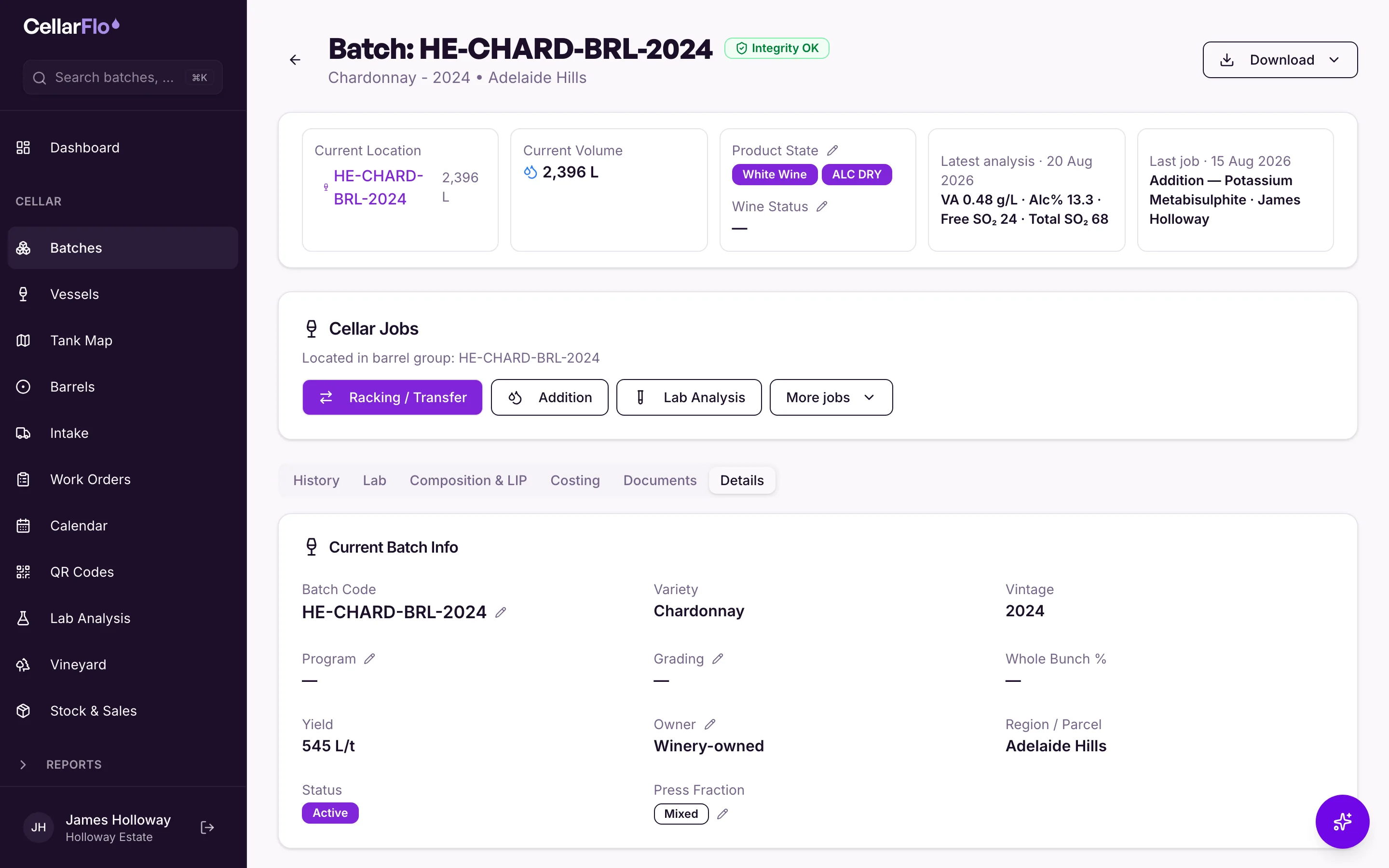
A batch page for a 2024 Adelaide Hills Chardonnay in a barrel group: the summary card with location, volume, product state, latest analysis and last job, the cellar job buttons, and the Details tab with its yield in litres per tonne, in the CellarFlo demo winery.

Cellar team

A clear plan for the day, and a quick way to record it.

  • Work from a printed Work Order that lists every vessel and barrel
  • Record a transfer with the litres out, any loss and the litres in checked before it saves
  • See what is in every tank and barrel, and how full it is, on the Tank Map
  • Scan a QR label to open a tank, barrel or wine
  • Use it on a phone or tablet as well as at the desk
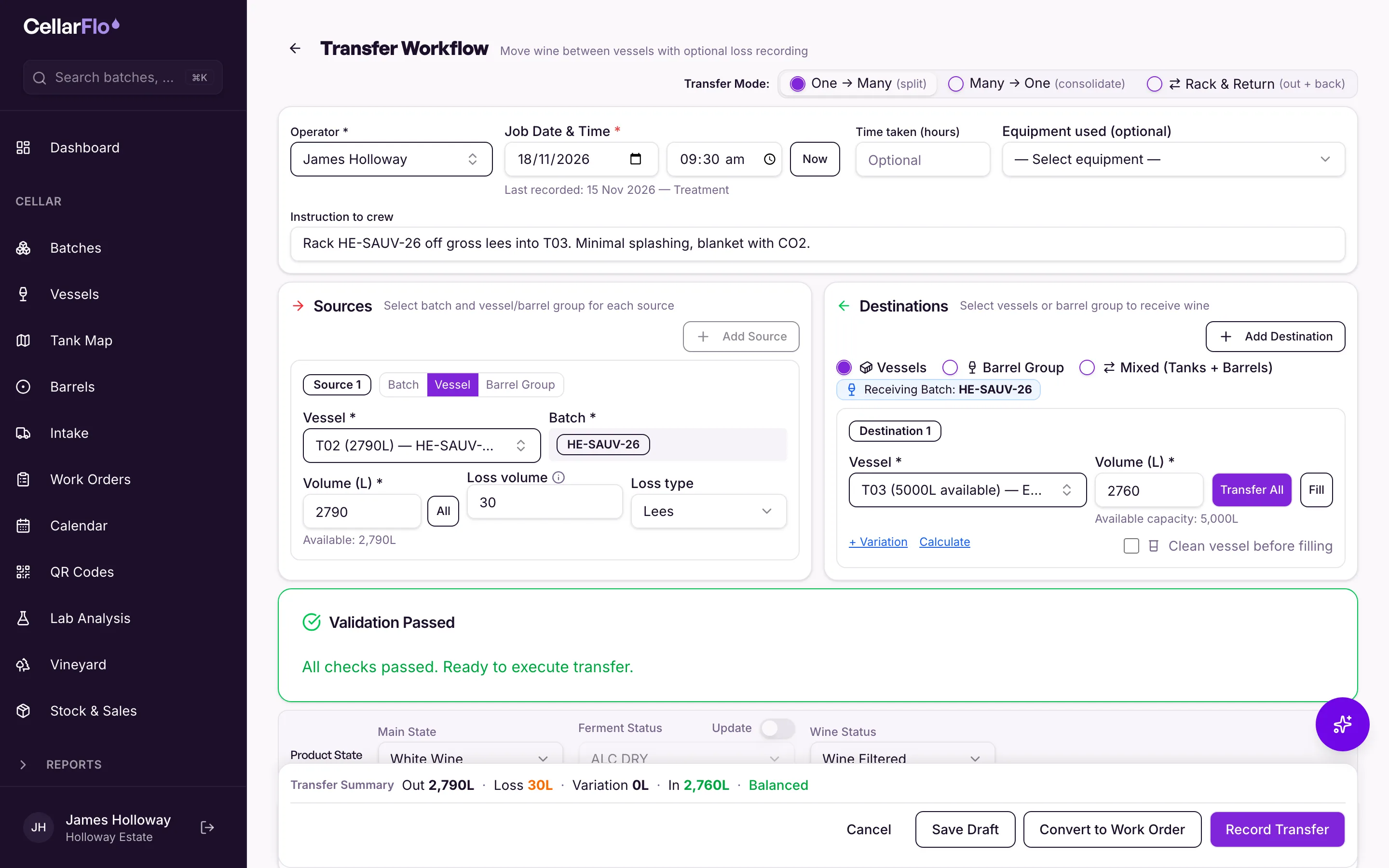
A Transfer job filled in to rack a Sauvignon Blanc off its lees into an empty tank, with the litres out, the lees loss and the litres in balanced in the summary pinned to the bottom of the page, in the CellarFlo demo winery.

Owner and finance

Know what each wine costs, and what it earns.

  • See the cost per litre of every wine, from fruit to bottle
  • Download batch cost reports to Excel
  • See the cost per case of every bottling and the margin on every channel
  • See gross profit by channel, customer, SKU and variety
  • Bring sales invoices from Xero, MYOB or QuickBooks in as orders to approve

Stock & Sales and accounting connections are on Estate and above.

A SKU's Pricing tab for a 2025 Pinot Noir dozen: its cost per case from its bottling, break-even prices, and for each sales channel the price, net after WET or CDC, gross profit in dollars and percent and a red, orange or green margin light, in the CellarFlo demo winery.

Vineyard

Your fruit, from the block to the winery.

  • Record maturity samples: Baumé or Brix, pH, TA and berry or bunch weights
  • Follow ripening on charts, with an estimate of when fruit reaches your target
  • Schedule picks on the Harvest Planner and track planned and actual tonnes
  • Keep growers, vineyards and blocks organised in one place
  • Follow a vineyard’s fruit forward to every wine it went into
Close-up of Product Recall for a 2025 Pinot Noir: its fruit docket with the grower, the vineyard and its address, the GI, 2,600 kg of fruit and the 1,900 litres of it in this wine, in the CellarFlo demo winery.

Compliance

Records kept as the work is done.

  • Every job is a dated entry with the name of the person who entered it
  • Recall a finished wine back to its vineyard and grower, or forward to everything it reached
  • Produce the Wine History Report for any wine, reconciled to the litre
  • Download additions, movements and packaging registers as CSV, Excel or PDF
  • Prepare Australian and New Zealand levy returns from your intake records
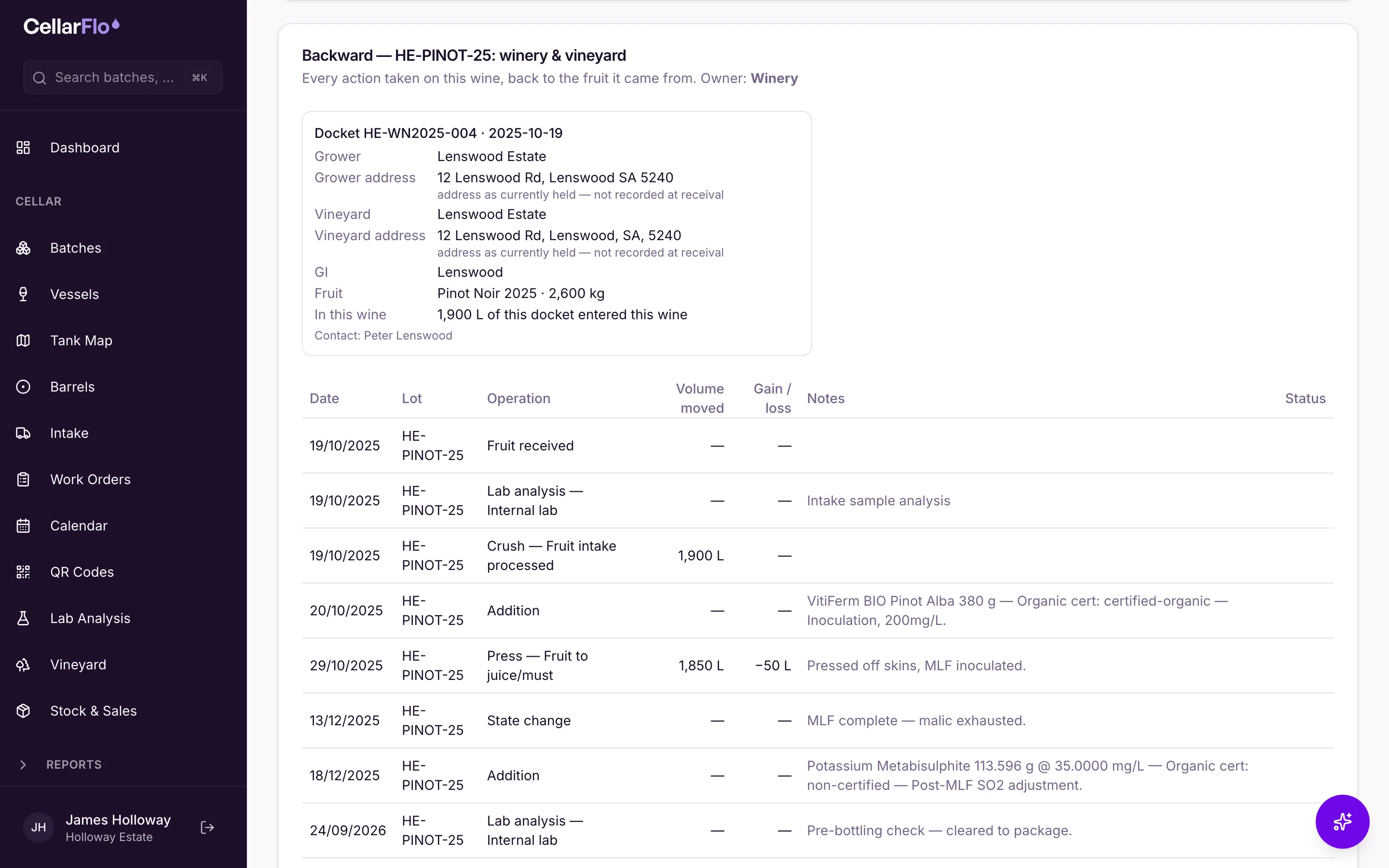
Product Recall run from the bottled batch code of a 2025 Pinot Noir, scrolled to the trace back to the vineyard: the fruit docket with grower, vineyard, address, GI and kilograms, then every dated job on the wine from fruit received, crush and press to additions and the packaging runs, in the CellarFlo demo winery.

Sales

Sell from stock you can see.

  • See stock on hand in every warehouse, and what is free to sell
  • Move Sale Orders from confirmed through picking and packed to dispatched
  • Set prices for each channel and see a margin light on every SKU
  • Bring in paid Commerce7 orders, matched to your customers and products
  • Sell mixed packs, with each wine drawn from its own bottled batch

Stock & Sales is on Estate and above.

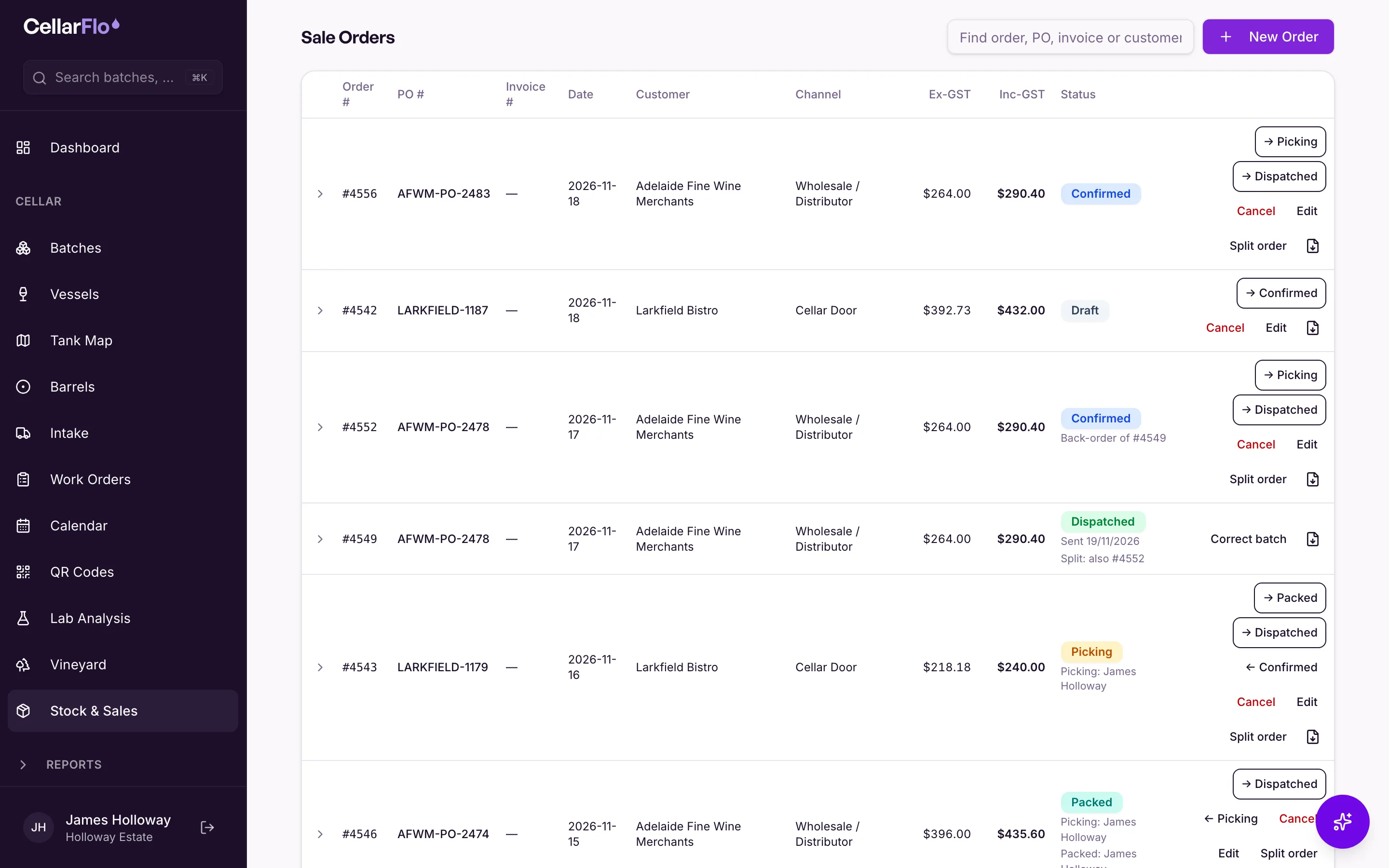
Sale Orders in Stock & Sales: cellar door, wine club and wholesale orders with customer, channel, ex-GST and inc-GST totals and each order's status from draft and confirmed through picking and packed to dispatched, in the CellarFlo demo winery.

Contract clients

Every client’s wine, kept in its own name.

  • Each client’s wine is marked with its owner in every tank, barrel and job
  • Costs and charges are recorded against the client as the work is done
  • A client’s month goes out as a CSV or a draft invoice in your accounting software
  • Client bottles stay in the client’s name and go back with a Manifest
  • Each client can have a read-only view of its own wine, stock and billed months

Needs the Contract Winemaking add-on. Draft invoices and client dispatch are on Estate and above.

AI Assistant

A little ask. A lot off your list.

Ask about your batches, vessels and volumes in your own words, and turn a question into a stock, additions, intake, costing or lab report. Included on every plan.

Why you can trust it

Built to be trusted with your wine’s record.

  • Nothing is written over.

    Every job is kept as a dated entry with the name of the person who entered it. A mistake is corrected by a new entry, and the original stays on the record.

  • Nothing is guessed.

    If a fact was never entered, CellarFlo shows “Not recorded” instead of filling the gap.

  • Your records are yours.

    An admin can download all of the winery’s records at any time: every table as a CSV file, with every file you uploaded. If you stop paying, you can still read and export them, free, for 12 months.

  • Kept safe.

    Encrypted connections, passwords stored only as one-way hashes, two-factor sign-in for every user who turns it on, each winery’s records kept apart from every other’s, and automatic database backups.

  • 30-day money-back guarantee.

    Email hello@cellarflo.com within 30 days of your first payment for a full refund of your subscription fees.

  • People you can reach.

    Made by a winemaker and used in his own winery. CellarFlo Technologies Pty Ltd (ABN 36 700 990 138) is a South Australian company, and a person answers at hello@cellarflo.com.

In brief

Know your cellar. Know your costs. Get more done.

  • CellarFlo is winery production software for Australian and New Zealand wineries crushing about 50 to 5,000 tonnes.
  • It follows every wine from fruit intake to bottle.
  • Costing, Label Integrity Program records and product recall are on every plan.
  • Plans start from $99 a month.
  • A free 24-hour demo winery needs no credit card.
  • It is made by CellarFlo Technologies Pty Ltd.

Questions

Ready when you are.

Get to know CellarFlo at your own pace.

What is CellarFlo?

Winery production software for Australian and New Zealand wineries. It follows every wine from fruit intake to bottle: cellar jobs, Work Orders, lab analysis, costing and Label Integrity Program records, in one place.

Is it the right size for my winery?

It is made for wineries crushing about 50 to 5,000 tonnes. Every plan has the full cellar workflow, including costing, Label Integrity Program records and product recall.

What does it cost?

From $99 a month. The plan builder gives your exact quote.

What does the free demo include?

24 hours in a preloaded demo winery, with batches, vessels, barrels, lab records and cellar workflows.

No credit card is needed, and the sample winery data is already loaded, so you can start exploring as soon as you confirm your email.

Can I move across from another system?

Yes. Our Winery Migration service brings your winery across from another winery system, spreadsheets or paper.

The onboarding guide walks you through preparing your records and setting up your winery.

Does it keep my Label Integrity Program records?

Yes. Every job is kept as a dated record of who entered it and when, and a correction is added as its own entry rather than written over the original. From a finished wine you can trace back to the vineyard and grower. A fact that was never entered shows as “Not recorded”. How the records work.

See your winery’s next chapter.

Built by a winemaker. For winemakers and business owners.